
Google cloud vision CLI for AI Agents

CLIs are eating MCPs. The industry is converging on the very same idea. MCPs for all their merit can be token hungry, slow, and unreliable for complex tool chaining. However, coding agents have become incredibly good at working with CLIs, and in fact they are far more comfortable working with CLI tools than MCP. With Composio's Universal CLI, your coding agents can talk to over 1000+ SaaS applications. With Google cloud vision, agents can bulk import product images from gcs csv, list all vision ai service locations, create a new product for image recognition, and more — all without worrying about authentication. This guide walks you through Composio Universal CLI and explains how you can connect it with coding agents like Claude Code, Codex, OpenCode, etc, for end-to-end Google cloud vision automation.

Google cloud vision logoGoogle cloud vision
Api Key

Google Cloud Vision API adds advanced image analysis—like labeling, OCR, and detection—to apps. It helps you extract structured data and insights from images at scale.

29 Tools

Introduction

CLIs are eating MCPs. The industry is converging on the very same idea. MCPs for all their merit can be token hungry, slow, and unreliable for complex tool chaining. However, coding agents have become incredibly good at working with CLIs, and in fact they are far more comfortable working with CLI tools than MCP.

With Composio's Universal CLI, your coding agents can talk to over 1000+ SaaS applications. With Google cloud vision, agents can bulk import product images from gcs csv, list all vision ai service locations, create a new product for image recognition, and more — all without worrying about authentication.

This guide walks you through Composio Universal CLI and explains how you can connect it with coding agents like Claude Code, Codex, OpenCode, etc, for end-to-end Google cloud vision automation.

Also integrate Google cloud vision with

What is Universal CLI and why use it?

The idea behind building the universal CLI is to give agents a single command interface to interact with all your external applications. Here's what you'll get with it:

  • Agent-friendly: Coding agents like Claude Code, Codex, and OpenCode can use CLI tools natively — no MCP setup required.
  • Authentication handled: Connect once via OAuth or API Key, and all CLI commands work with your credentials automatically.
  • Tool discovery: Search, inspect, and execute 20,000+ tools across 1000+ apps from one interface.
  • Trigger support: Use triggers to listen for events across your apps, powered by real-time webhooks or polling under the hood.
  • Type generation: Generate typed schemas for autocomplete and type safety in your projects.

Prerequisites

Install the Composio CLI, authenticate, and initialize your project:

bash
# Install the Composio CLI
curl -fsSL https://composio.dev/install | bash

# Authenticate with Composio
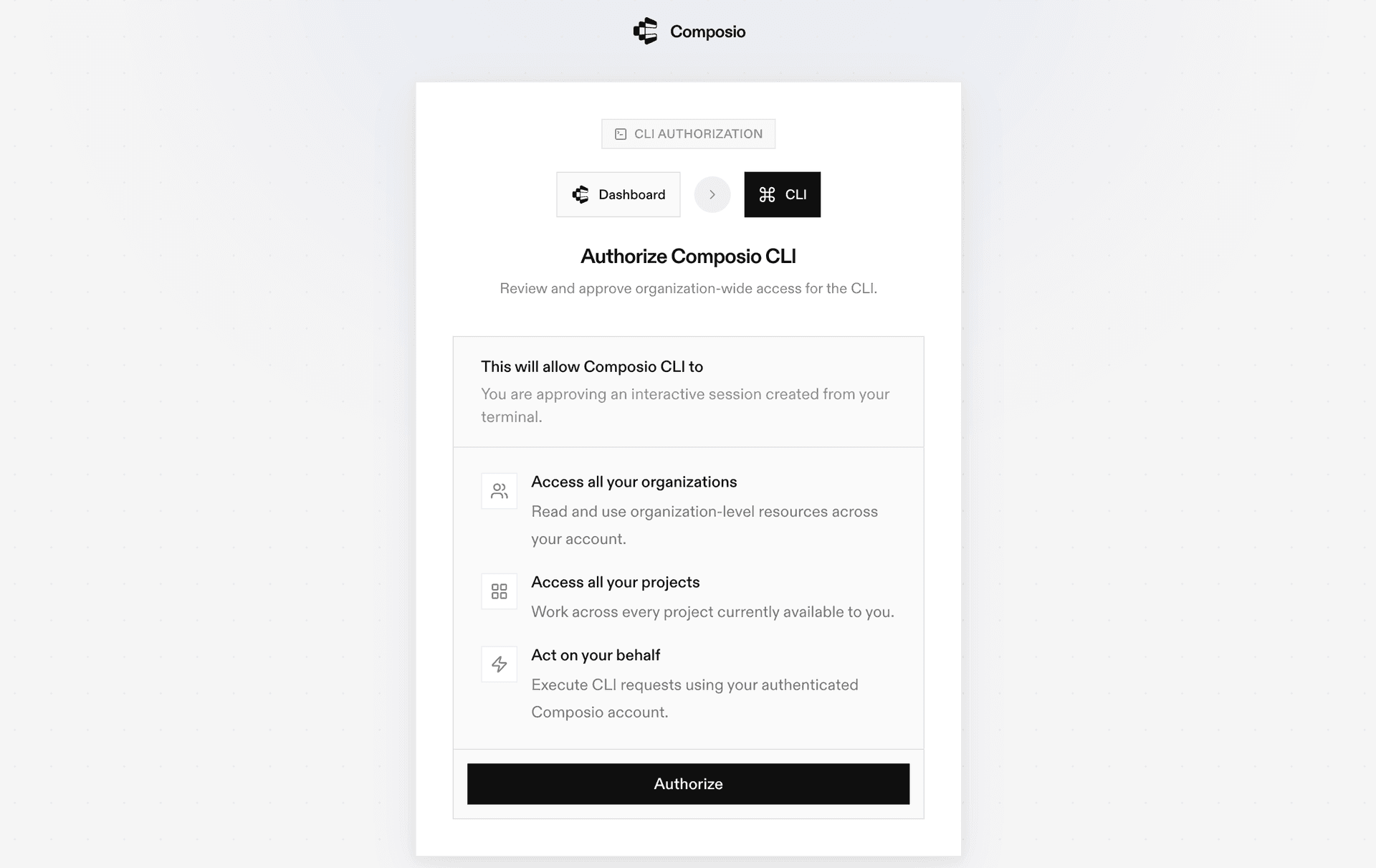
composio login

During login you'll be redirected to sign in page, finish the complete flow and you're all set.

Composio CLI authentication flow

Connecting Google cloud vision to Coding Agents via Universal CLI

Once it is installed, it's essentially done. Claude Code, Codex, OpenCode, OpenClaw, or any other agent will be able to access the CLI. A few steps to give agents access to your apps.

  1. Launch your Coding Agent — Claude Code, Codex, OpenCode, anything you prefer.
  2. Prompt it to "Authenticate with Google cloud vision"
  3. Complete the authentication and authorization flow and your Google cloud vision integration is all set.
  4. Start asking anything you want.

Universal CLI Commands for Google cloud vision

You can also manually execute CLI commands to interact with your Google cloud vision.

Connect your Google cloud vision account

Link your Google cloud vision account and verify the connection:

bash
# Connect your Google cloud vision account (opens OAuth flow)
composio connected-accounts link google_cloud_vision

# Verify the connection
composio connected-accounts list --toolkits google_cloud_vision

Discover Google cloud vision tools

Search and inspect available Google cloud vision tools:

bash
# List all available Google cloud vision tools
composio tools list --toolkit google_cloud_vision

# Search for Google cloud vision tools by action
composio tools search "google cloud vision"

# Inspect a tool's input schema
composio tools info GOOGLE_CLOUD_VISION_CREATE_PRODUCT

Common Google cloud vision Actions

Create Vision ProductTool to create and return a new Product resource

bash
composio tools execute GOOGLE_CLOUD_VISION_CREATE_PRODUCT \
  --parent "projects/my-project/locations/us-east1" \
  --displayName "My Product" \
  --productCategory "apparel-v2"

Create ReferenceImageTool to create a ReferenceImage under a product

bash
composio tools execute GOOGLE_CLOUD_VISION_CREATE_REFERENCE_IMAGE \
  --uri "gs://my-bucket/path/to/image.jpg" \
  --parent "projects/my-project/locations/us-west1/products/12345"

Delete ProductTool to permanently delete a Product and its reference images

bash
composio tools execute GOOGLE_CLOUD_VISION_DELETE_PRODUCT \
  --name "projects/my-project/locations/us-east1/products/my-product"

Get ProductTool to get information associated with a Product

bash
composio tools execute GOOGLE_CLOUD_VISION_GET_PRODUCT \
  --name "projects/my-project/locations/us-east1/products/my-product"

Generate Type Definitions

Generate typed schemas for Google cloud vision tools to get autocomplete and type safety in your project:

bash
# Auto-detect language
composio generate --toolkits google_cloud_vision

# TypeScript
composio ts generate --toolkits google_cloud_vision

# Python
composio py generate --toolkits google_cloud_vision

Tips & Tricks

  • Always inspect a tool's input schema before executing: composio tools info <TOOL_NAME>
  • Pipe output with jq for better readability: composio tools execute TOOL_NAME -d '{}' | jq
  • Set COMPOSIO_API_KEY as an environment variable for CI/CD pipelines
  • Use composio dev logs tools to inspect execution logs and debug issues

Next Steps

  • Try asking your coding agent to perform various Google cloud vision operations
  • Explore cross-app workflows by connecting more toolkits
  • Set up triggers for real-time automation
  • Use composio generate for typed schemas in your projects
TOOLS

Supported Tools

Every Google cloud vision action and event your agent gets out of the box.

Annotate Files with Vision API

Tool to perform image detection and annotation for batch files in Google Cloud Vision.

Async Batch Annotate Files

Tool to run asynchronous image detection and annotation for a list of generic files (PDF, TIFF, GIF).

Annotate Images

Run image detection and annotation for a batch of images using Google Cloud Vision API.

Annotate Images Async Batch

Tool to run asynchronous image detection and annotation for a batch of images.

Annotate Location Images

Tool to run image detection and annotation for a batch of images scoped to a specific project and location.

Create Vision Product

Creates a new Product resource in Google Cloud Vision Product Search.

Create Product Set

Creates a new ProductSet resource in Google Cloud Vision Product Search.

Create ReferenceImage

Tool to create a ReferenceImage under a product.

Delete Product

Permanently deletes a Product and its associated reference images from Google Cloud Vision API.

Get Product

Tool to get information associated with a Product.

Get Product Set

Tool to get a ProductSet.

Import Product Sets

Asynchronously imports product sets and reference images from a CSV file stored in Google Cloud Storage.

List Vision AI IndexEndpoints

Lists IndexEndpoints in Vertex AI Vision for a given project and location.

List Locations

Tool to list available Vision AI service locations for a project.

List Vision API Operations

Tool to list operations that match the specified filter.

Purge Products

Tool to asynchronously delete products in a ProductSet or orphan products.

Update Product

Tool to update a Product's mutable fields: displayName, description, and productLabels.

Update Product Set

Tool to update a ProductSet resource.

Add Product to ProductSet

Add a Product to a ProductSet in Google Cloud Vision Product Search.

Cancel Vision Operation

Starts asynchronous cancellation of a long-running Vision API operation.

Delete Vision API Operation

Tool to delete a long-running Vision API operation.

Delete Product Set

Tool to permanently delete a ProductSet.

Delete Reference Image

Permanently removes a reference image from a product in Google Cloud Vision Product Search.

Get Vision API Operation

Retrieves the latest state of a long-running Vision API operation.

Get Reference Image

Tool to get information associated with a ReferenceImage.

List Products in ProductSet

Tool to list Products in a specified ProductSet.

List Projects

List Google Cloud projects accessible to the authenticated user via Cloud Resource Manager API.

List Reference Images

Tool to list reference images for a product.

Remove Product from ProductSet

Removes a Product from a specified ProductSet in Google Cloud Vision API.

FAQ

Frequently asked questions

The Composio Universal CLI is a single command-line interface that lets coding agents and developers interact with 1000+ SaaS applications. It handles authentication, tool discovery, action execution, and trigger setup — all from the terminal, without needing to configure MCP servers.

Any coding agent that can run shell commands works with the Composio CLI — including Claude Code, Codex, OpenCode, OpenClaw, and others. Once the CLI is installed, agents automatically discover and use the composio commands to interact with Google cloud vision and other connected apps.

MCP servers require configuration and can be token-heavy for complex workflows. The CLI gives agents a direct, lightweight interface — no server setup needed. Agents simply call composio commands like any other shell tool. It's faster to set up, more reliable for multi-step tool chaining, and works natively with how coding agents already operate.

All sensitive data such as tokens, keys, and configuration is fully encrypted at rest and in transit. Composio is SOC 2 Type 2 compliant and follows strict security practices so your Google cloud vision data and credentials are handled as safely as possible. You can also bring your own OAuth credentials for full control.

Start with Google cloud vision.It takes 30 seconds.

Managed auth, hosted MCP servers, and every Google cloud vision tool your agent needs.Free to start.

Start building